
Duolingo has spent a decade turning language learning into a habit loop: streaks, leagues, gem rewards, and a green owl that isn’t afraid to guilt-trip you. Its newest feature takes that strategy somewhere no other education app has gone — instead of just competing for your attention, it locks up the apps that are stealing it.
That feature is called Focus Mode, and here’s what it actually does, how it works under the hood, and what’s still unclear about it.
What Focus Mode Does
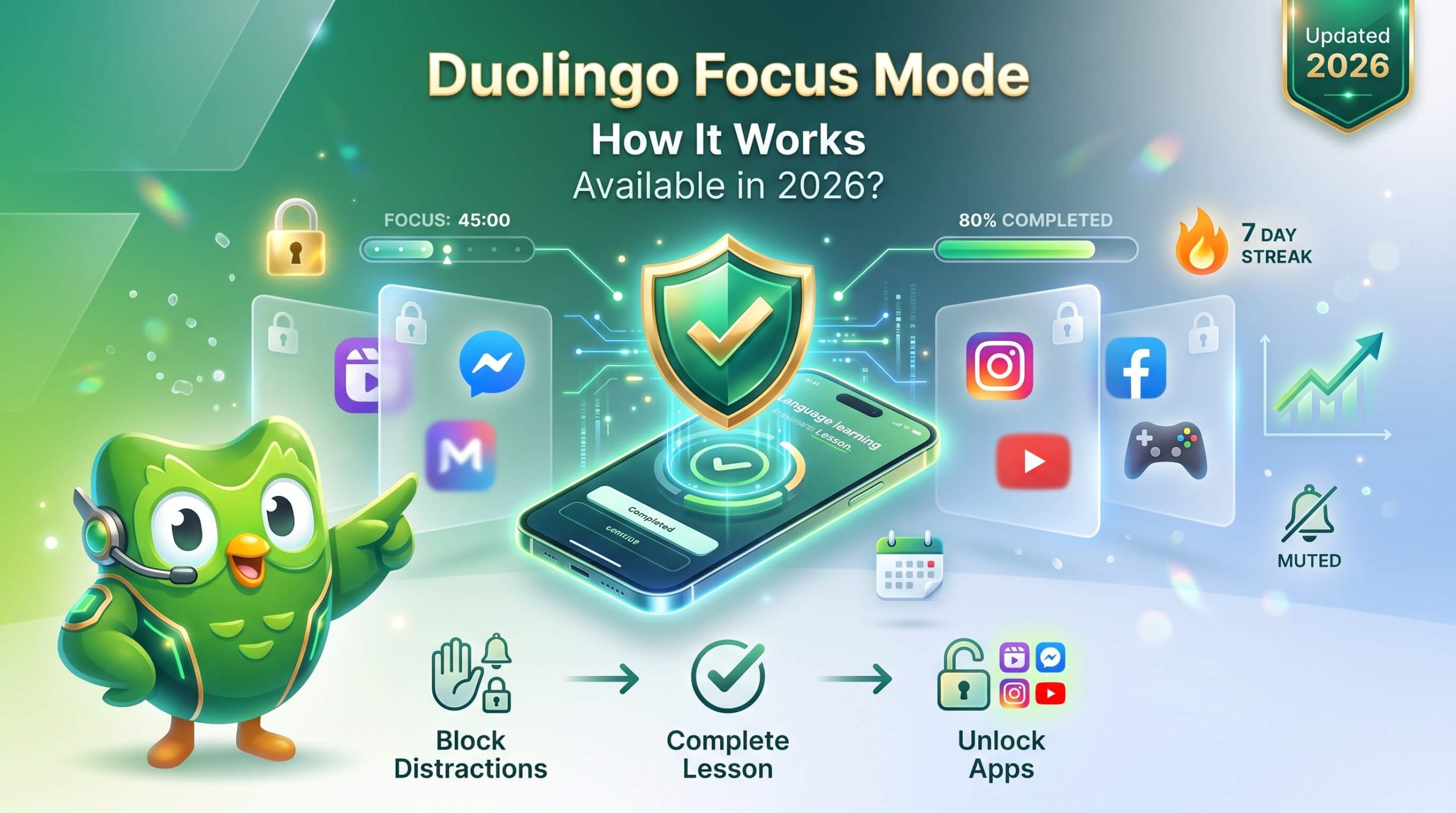
Focus Mode is an opt-in tool that blocks access to other apps on your phone until you complete a set number of Duolingo lessons for the day. In practice, it works like this:
- You turn Focus Mode on inside Duolingo and grant it permission to see your device’s screen-time settings.
- You choose which apps or app categories to restrict — social media, games, entertainment, or specific apps by name.
- You set a daily lesson goal (reporting on early tests describes this as a choice of 1, 2, or 3 lessons).
- Until you hit that goal, the apps you selected appear greyed out on your home screen.
- If you try to open a blocked app anyway, Duolingo shows a message asking you to finish your lesson first.
The feature is fully reversible at any point. You can pause the restriction or turn it off entirely — there’s no passcode lock or surprise lockout involved. It’s less a punishment than a speed bump: the friction is designed to interrupt the reflex of picking up your phone and opening TikTok, not to trap you.
How It Works: The Technology Behind the Block
Focus Mode isn’t Duolingo reinventing app-blocking from scratch. It’s built on Apple’s Screen Time framework — the same underlying system Apple uses for its own parental controls and Digital Wellbeing tools, made available to third-party developers through a set of APIs.
That framework is really three separate pieces working together:
- FamilyControls handles authorization — it’s the part that asks you for permission to let an app like Duolingo see and restrict your device activity.
- ManagedSettings does the actual blocking. Once you’ve picked your apps, Duolingo can apply a “shield” that locks them at the operating-system level.
- DeviceActivity manages scheduling — it’s what lets Duolingo check whether you’ve hit your lesson goal and lift the restriction automatically.
One detail worth understanding if you’re wondering about privacy: Apple designed this framework so that third-party apps don’t get a plain-language list of which apps you’ve chosen to block. Your selections are represented internally as encrypted tokens, not app names, which is part of why Apple markets the framework as privacy-preserving. Duolingo can tell that an app is shielded and can display its icon back to you through the system, but it isn’t necessarily working from a readable list the way it might appear.
That said, this is a genuinely difficult API for developers to build on. Independent technical write-ups from developers who’ve shipped similar screen-time-blocking features describe persistent bugs — tokens that change unexpectedly, inconsistent shield behavior, and edge cases where an app can end up partially blocked. None of this is unique to Duolingo, but it’s a realistic reason why early testers of Focus Mode might occasionally see it behave inconsistently, and why a feature like this often rolls out gradually rather than to everyone at once.
Is Focus Mode Available Now?
[VERIFY: exact rollout status and date] — here’s what’s genuinely confirmed versus unclear, based on available reporting as of early July 2026:
- Duolingo has publicly previewed the feature and described it as something the team has been building.
- Independent coverage from March through May 2026 describes it as something Duolingo is actively testing with a portion of users, not something available to every Duolingo user by default.
- Reporting on the feature is iOS-specific. No source describes an Android version, and it’s not clear from available information whether one is planned.
If you don’t see Focus Mode in your app yet, that’s consistent with what’s been reported: this reads as a phased test rather than a finished, universal rollout. The most reliable way to check your own access is to look for a “Focus Mode” option in Duolingo’s app settings, since feature availability by region, platform, and test group can change quickly and isn’t something a search result can guarantee is current.
Why Duolingo Built This
Duolingo’s core business problem has always been retention: people install a language app with good intentions and then stop opening it. The company’s answer, historically, has been gamification — daily streaks, XP, leagues you can win or get bumped out of, and reminders from Duo the owl that have become a meme in their own right.
Focus Mode is a logical extension of that same instinct, but aimed at a different failure point. Streaks solve the “I forgot to open the app” problem. Focus Mode is aimed at the “I opened the app, then got distracted by something else on my phone before finishing” problem — which, based on user accounts describing late-night, half-hearted lesson completions just to preserve a streak, is a real and common pattern.
There’s an obvious business upside for Duolingo here too: if opening TikTok or Instagram requires finishing a lesson first, that’s more guaranteed screen time inside Duolingo’s own app. That’s not a criticism so much as context — most attention-economy features, from screen-time caps to notification nudges, benefit the company that builds them as much as the user, and Focus Mode is no exception. It’s also worth noting that Duolingo isn’t inventing app-blocking as a concept; dedicated screen-time and focus apps have offered similar functionality for years. What’s new is a language-learning app gating that functionality behind its own lesson completion, rather than a neutral third party doing it.
How Focus Mode Compares to Built-In Screen Time Tools
If this sounds familiar, it’s because both Apple and Android already ship native tools that do something similar:
| Native Tools | Duolingo Focus Mode | iOS Screen Time / Android Digital Wellbeing |
|---|---|---|
| What it blocks | Apps you choose, until a lesson goal is met | Apps you choose, on a time-based schedule |
| Unlock condition | Complete 1–3 Duolingo lessons | Time limit expires, or you request more time |
| Built by | Duolingo, using Apple’s Screen Time API | Apple / Google natively |
| Platform | iOS (per available reporting) | Both iOS and Android |
| Override | Yes, fully user-controlled | Yes, typically with a “request more time” prompt |
The distinction is the unlock mechanism. Native tools gate access behind time — wait until your allotment resets. Focus Mode gates access behind a completed activity — finish a lesson and the block lifts immediately, whenever that happens. For someone who responds better to “do the thing” than “wait it out,” that’s a meaningfully different incentive structure, though it’s also worth being honest that swapping doomscrolling for a different app’s gamified loop isn’t the same as reducing screen time overall.
What Happens When You Try to Open a Blocked App
Based on how the feature has been described by early testers, the experience is straightforward rather than punitive. If you set Focus Mode restrictions and then tap on an app you’ve blocked — say, Instagram — before finishing your lesson goal, you don’t get locked out silently or redirected without explanation. Instead, the app shows a message telling you to stay focused and pointing you back to Duolingo. The blocked app’s icon appears greyed out on your home screen as a visual reminder of what’s currently off-limits.
This matters for a simple reason: the whole system depends on you having agreed to it in the first place. Nothing about Focus Mode works unless you’ve opted in, chosen your own restricted apps, and set your own lesson target. If you decide the restriction isn’t working for you in the moment, you can turn it off or pause it — there’s no described mechanism that traps you into finishing a lesson against your will, and no indication of a passcode-style lock that a friend or family member would need to bypass. That’s a meaningfully different design than, say, parental-control software, which is often built specifically to resist being switched off by the person being restricted.
Common Questions About Focus Mode
Does Focus Mode cost money, or is it a Duolingo Super/Plus feature?
Focus Mode requires a paid Duolingo subscription or is available to free users. Given that Duolingo’s core learning content includes both free and subscription tiers, this is worth checking directly in the app rather than assuming either way.
Can I choose exactly which apps get blocked, or only categories?
Reporting describes both options: you can restrict entire categories (social media, games, entertainment) or select individual apps by name.
What if I need to use a blocked app for something urgent?
Because the feature is fully optional and user-controlled, you can turn off or override the restriction at any time. There’s no reporting suggesting an emergency-bypass system distinct from just disabling Focus Mode yourself.
Does this work the same way as Apple’s own Screen Time limits?
Not exactly. Apple’s native Screen Time tool restricts apps based on elapsed time and lets you request more time when a limit is hit. Focus Mode restricts apps based on whether you’ve completed a specific number of Duolingo lessons — the block lifts the moment you finish, regardless of how much or little time that took.
Will this feature come to Android?
Every source describing Focus Mode discusses it in the context of iOS and Apple’s Screen Time framework specifically. Nothing in available reporting confirms or denies Android plans, and Android doesn’t have a directly equivalent first-party framework in the same form, which may affect how (or whether) a similar feature could be built there.
Is this the same as Duolingo’s other “focus” content, like tips on paying attention while studying?
No — Duolingo has separately published educational content about attention and concentration as cognitive skills (for example, tips on studying in consistent environments or doing an “attention audit” of what distracts you). That’s general learning-science advice, unrelated to the app-blocking Focus Mode feature described here. If you’re searching for one and find the other, they’re genuinely different things that happen to share a name.
A Reasonable Amount of Skepticism
It’s worth sitting with the fact that Focus Mode is, functionally, an attention-retention tool built by a company whose business model depends on attention retention. That’s not a reason to dismiss it — plenty of useful tools are also good for the businesses that make them — but it’s a reasonable thing to keep in mind when deciding whether to grant any app deeper permissions over your device.
A few practical questions worth asking before turning it on: Do you actually want another app requesting access to your Screen Time settings, on top of whatever you’re already using? Are you solving a real problem you’ve noticed in your own habits, or turning on a feature because it was announced? And if the goal is genuinely to reduce time lost to distracting apps, would a neutral third-party tool — one without a stake in maximizing your engagement with a specific product — serve that goal better?
None of this makes Focus Mode a bad feature. It’s a creative, technically sound use of a legitimate Apple framework, aimed at a real and commonly reported problem — finishing lessons half-heartedly just to preserve a streak. But it’s fair to evaluate it as what it is: a retention mechanic that happens to also function as a productivity tool, rather than a neutral productivity tool that happens to be made by a learning app.
Should You Turn It On?
Focus Mode is worth trying if:
- You’ve noticed yourself doing the “just enough to keep the streak alive” version of Duolingo rather than genuinely engaging with lessons.
- You already use screen-time tools and know that time-based limits don’t work well for you, but activity-based unlocks might.
- You’re comfortable granting an app permission to interact with your device’s screen-time settings.
It’s probably not for you if:
- You’d rather manage distractions with a neutral, non-gamified tool rather than one built by the app you’re trying to build a habit around.
- You’re not sure you want another app requesting Screen Time permissions, given that this is a newer use of the API and the rollout is still limited.
- You primarily use Android, where availability isn’t yet confirmed.
Bottom Line
Focus Mode is Duolingo’s attempt to solve procrastination at the source: instead of just reminding you to practice, it makes your other apps briefly unavailable until you do. It’s built on Apple’s existing Screen Time framework, it’s fully optional and reversible, and early reporting places it as an active test on iOS rather than a finished feature available to everyone. If it’s not in your app yet, that’s consistent with what’s currently known about its rollout — not a sign that anything is broken on your end.
As with any feature still in testing, the smartest move is to check Duolingo’s own app settings and official channels for the most current word on availability in your account, rather than relying on any single article — including this one — to have the final answer.